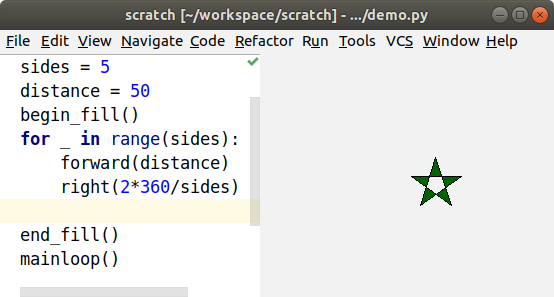
Live coding tightens the feedback loop between making a change to your code and seeing the change in behaviour. As you type your code, it will run over and over, showing a visualization of the program state, a matplotlib graph, a Pillow image, or turtle graphics. If you make a mistake, you’ll immediately see the problem and where it went wrong.
To see how to use one of the Live Coding in Python plugins, watch the demo video or read the getting started pages for PyCharm, Emacs, or Sublime Text. Want to try it without installing anything? Try the browser version. You can also try Space Tracer, the command-line tool that trades time for space when you debug. You might also find some useful examples in the tools folder. To learn more, read about how it works.
Special thanks to James Davies for contributing the Sublime Text support, to Antti Kaihola and Christoph Paulik for contributing the Emacs support, and to Brecht Willems for the idea of flag tutorials. Thanks to all the contributors for helping in all kinds of ways, and thanks to JetBrains for the free PyCharm and IDEA licenses.
If you like this project, check out some of my other projects.
Feature Comparison
So far, the Emacs mode seems to be the most popular way to use live coding in Python, and the PyCharm plugin has the most features. The browser version might be the best for students, because it has tutorials and doesn’t need to be installed.
| Feature | PyCharm | Emacs | Sublime | browser | space_tracer |
|---|---|---|---|---|---|
| variable assignments | Y | Y | Y | Y | Y |
| looping | Y | Y | Y | Y | Y |
| function calls | Y | Y | Y | Y | Y |
| errors and exceptions | Y | Y | Y | Y | Y |
| print function | Y | Y | Y | Y | Y |
| unit tests | Y | Y | Y | Y | |
| turtle graphics | Y | Y | |||
| matplotlib preview | Y | Y | |||
| pyglet preview | Y | Y | |||
| tutorials and goals | Y |
If you find the project useful, help us make it better.
Installing the PyCharm plugin
This assumes you already have PyCharm installed, you have configured a Python interpreter, and you can run a Python script normally.
- From the File menu, choose Settings….
- Click on the Plugins section.
- Click the Browse Repositories… button.
- Type live coding in the search box, and click on the “Live Coding in Python” entry in the list below.
- Click the green Install button on the right.
- Click the Restart PyCharm button.
- Close all the dialog boxes by clicking OK, then let PyCharm restart when it asks.
- Open a Python file.
- Run the Python file normally, as a script or a unit test.
- With the same run configuration selected in the drop down, choose Start Live Coding from the Run menu.
Uninstalling the PyCharm plugin
- From the File menu, choose Settings….
- Click on the Plugins section.
- In the list of plugins, click on Live Coding in Python.
- Click the Uninstall button on the right.
- Click the Restart PyCharm button.
- Close all the dialog boxes by clicking OK, then let PyCharm restart.
Installing the Emacs mode
It’s probably easiest to use the MELPA package archive, as described in this section, but the next section gives instructions for installing without MELPA.
- Install GNU Emacs if you don’t already have it.
- Install MELPA. You probably want to follow the instructions for the stable version, instead of the default bleeding-edge version.
- Launch the package installer with
M-x package-list-packages. - Find the package with
C-s live-py-mode. If you can’t find it, runM-x package-refresh-contents, and try again. - Mark the package to install with
i, then execute the installation withx. - Open any Python file, and activate live-py-mode with
M-x live-py-mode. You should see an extra window on the right that shows the results of running your code. - Type
C-h mand scroll down to the Live-Py section to see all the advanced features that let you run other versions of Python or drive your live coding from another script or a unit test.
Installing the Emacs mode without MELPA
- Install GNU Emacs if you don’t already have it.
-
Clone the latest version of the live-py Emacs mode:
git clone https://github.com/donkirkby/live-py-plugin.git -
Copy the Emacs Lisp file and the supporting Python files into a directory which is in your Emacs
load-path. For example:cd live-py-plugin mkdir -p ~/.emacs.d/packages cp emacs-live-py-mode/live-py-mode.el plugin/PySrc/space_tracer ~/.emacs.d/packagesAdd ~/.emacs.d/ to your
load-pathin~/.emacs.d/init.elor~/.emacs:(add-to-list 'load-path "~/.emacs.d/packages") -
Load the Lisp library in your
~/.emacs.d/init.elor~/.emacs:(require 'live-py-mode) - Restart Emacs.
- Open any Python file, and activate live-py-mode with
M-x live-py-mode. You should see an extra window on the right that shows the results of running your code. - Type
C-h mand scroll down to the Live-Py section to see all the advanced features that let you run other versions of Python or drive your live coding from another script or a unit test.
Uninstalling the Emacs mode
If you installed with MELPA, just use it to uninstall. If not, follow these steps:
- Remove the files you copied into
~/.emacs.d/: - Revert additions to
~/.emacs.d/init.elor~/.emacs. - Restart Emacs.
Installing the Sublime Text plugin
It’s easiest to install from package control, but you can find a manual method in the CONTRIBUTING file.
- Install package control.
- Open the command palette by typing Ctrl+Shift+P.
- Type “Package” and then select Package Control: Install Package.
- Start typing “Live Coding in Python” and select it when it appears in the list.
- When it finishes installing, you should see a new “Live Coding” menu.
- Live coding should now work for simple scripts.
- Navigate to Preferences -> Package settings -> Live Coding.
- Set the path to your preferred Python executable, particularly if you want to
use a virtual environment. The default is
python. - Save and close this pane.
- Open or create a Python file.
- Navigate to Live Coding -> Start
- This should bring up a new pane on the right with the live coding display.
- Begin typing in the left pane and see the code trace results on the right.
Uninstalling the Sublime Text plugin
- Open Sublime Text 3.
- Open the command palette by typing Ctrl+Shift+P.
- Type “Package” and then select Package Control: Remove Package.
- Start typing “Live Coding in Python” and select it when it appears in the list.